

The shift in 2026
Podcasting isn’t slowing down. In fact, the number of podcasts continues to grow, but so does the competition for listeners’ attention. It's no longer enough to just have a podcast; you need one that sounds professional and is easily discoverable. What worked in 2020 won’t necessarily work in 2026.
Listener expectations have definitely shifted. What was once acceptable audio quality is now considered amateurish. People are used to crisp, clear sound, and they’ll quickly tune out if your podcast doesn’t deliver. Discoverability is another major hurdle; platforms are crowded, and algorithms are complex. You need a solid setup and a smart strategy to stand out.
Beyond simply recording and publishing, the most successful podcasts are now heavily focused on repurposing content. Short-form video clips for TikTok and YouTube, audiograms for social media, and blog posts summarizing key takeaways are all essential components of a modern podcasting workflow. Think of your podcast as a hub, with content radiating out to multiple platforms.
Picking a microphone
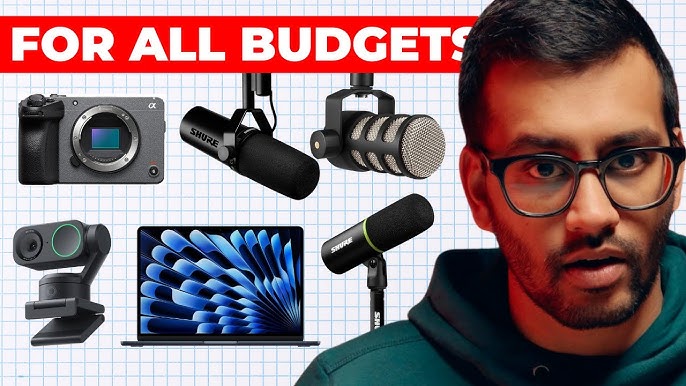
Choosing a microphone is the first major decision. You’ll quickly find yourself facing a choice between dynamic and condenser microphones. Dynamic mics, like the Shure SM58 – a stage standard for decades – are durable, reject background noise well, and are generally more affordable. They're excellent for less-than-ideal recording environments.
Condenser microphones are more sensitive and capture a wider frequency range, resulting in a richer, more detailed sound. They require phantom power (usually 48V), supplied by an audio interface or mixer. They're ideal for quiet, treated rooms. The Audio-Technica AT2020 is a popular entry-level condenser option. Think about your recording space when deciding.
Polar patterns dictate how the microphone picks up sound. Cardioid patterns are the most common for podcasting; they focus on sound directly in front of the mic, minimizing noise from the sides and rear. Omnidirectional patterns pick up sound from all directions, useful for recording multiple speakers around a table, but require a very quiet room. Bidirectional patterns capture sound from the front and rear, good for interviews.
USB microphones have improved dramatically in recent years. Models like the Rode NT-USB+ offer excellent sound quality and convenience. However, XLR microphones, connected to an audio interface, generally provide better audio fidelity and more control. The benefit of XLR is the flexibility to upgrade components individually.
Don't rely on software noise cancellation. It usually makes your voice sound like you're underwater. I've found it's always better to just turn off the AC or move to a closet than to try and fix a noisy room with a 'smart' mic.
- Dynamic microphones like the Shure SM58 are great if you record in a noisy bedroom because they don't pick up every little sound.
- Condenser Microphones: Sensitive, detailed sound, requires phantom power (e.g., Audio-Technica AT2020)
- Cardioid Polar Pattern: Focuses on sound in front of the mic
- Omnidirectional Polar Pattern: Picks up sound from all directions
- Bidirectional Polar Pattern: Captures sound from front and rear
Popular Podcast Microphones: A Comparison for Beginners (2026)
| Microphone Model | Type | Polar Pattern | Connection Type | Price Range (USD) | Best For |
|---|---|---|---|---|---|
| Shure SM58 | Dynamic | Cardioid | XLR | Around $100 | Versatile, good for various voices and environments |
| Rode NT-USB+ | Condenser | Cardioid | USB | Around $170 - $230 | Solo recording, voiceovers, streaming, easy setup |
| Audio-Technica AT2020 | Condenser | Cardioid | XLR | Around $100 | Home studio recording, vocals, instruments (requires audio interface) |
| Samson Q2U | Dynamic | Cardioid | USB/XLR | Around $60 - $80 | Beginners, portable recording, interviews |
| Blue Yeti | Condenser | Cardioid, Bidirectional, Omnidirectional, Stereo | USB | Around $130 - $180 | Solo or multi-person recording, flexible patterns |
| Electro-Voice RE20 | Dynamic | Cardioid | XLR | Around $450 | Broadcast-quality sound, professional voiceovers, requires audio interface |
Illustrative comparison based on the article research brief. Verify current pricing, limits, and product details in the official docs before relying on it.
Interfaces and signal flow
An audio interface is the bridge between your microphone and your computer. It converts the analog signal from your mic into a digital signal your computer can understand. It also provides phantom power for condenser microphones and allows you to connect headphones for monitoring. Focusrite Scarlett interfaces are a popular and reliable choice.
A mixer combines multiple audio signals into one. It allows you to control the volume levels of each source, apply equalization, and add effects. Mixers are useful if you have multiple microphones or instruments. While many interfaces now have mixing capabilities, a dedicated mixer offers more control.
Phantom power, typically 48V, is essential for condenser microphones. Gain staging is the process of setting the input levels to maximize signal strength without clipping (distortion). Clean audio input is paramount; avoid noise and distortion at all costs. A good interface will have clear gain knobs and metering.
Having multiple inputs is incredibly helpful if you plan to record with co-hosts or guests. It allows everyone to have their own dedicated input, giving you more control over the mix. Connecting everything involves using XLR cables to connect your microphones to the interface or mixer, and then connecting the interface to your computer via USB.
- Connect your microphone to the audio interface or mixer using an XLR cable.
- Connect headphones to the interface or mixer for monitoring.
- Connect the interface to your computer via USB.
- Set the input gain on the interface or mixer to an appropriate level.
Headphones and Monitoring: Hear Yourself Clearly
Closed-back headphones are essential for podcasting. They prevent sound from leaking out and being picked up by your microphone, which can cause feedback or unwanted echoes. Open-back headphones, while offering a more natural sound, are not suitable for recording because of this bleed.
Impedance is a measure of a headphone’s resistance to electrical current. Higher impedance headphones generally require a headphone amplifier to deliver sufficient volume and sound quality. Lower impedance headphones are easier to drive and can be used with most audio interfaces.
Comfort is crucial, especially for long recording sessions. Choose headphones that fit well and don’t cause discomfort. Monitoring is the process of listening to your own voice while recording. It allows you to adjust your levels and ensure you’re speaking clearly. It’s vital for a good recording.
Recording and Editing Software: Your Digital Studio
Digital Audio Workstations (DAWs) are the heart of your podcasting setup. Audacity is a free, open-source option that's surprisingly powerful. GarageBand is another excellent free option, but it’s exclusive to Mac users. Adobe Audition is a professional-grade DAW with a comprehensive feature set, but it requires a paid subscription.
Descript is a newer DAW that’s gaining popularity for its unique text-based editing interface. It also offers AI-powered features like Overdub, which allows you to correct mistakes by simply typing. Each DAW has its strengths and weaknesses; it's a matter of personal preference.
Key features for podcasting include multi-track editing (allowing you to edit each audio source separately), noise reduction (to remove unwanted background noise), equalization (to adjust the tonal balance of your audio), and compression (to even out the dynamics of your voice).
Editing involves cutting out mistakes, trimming silences, adding intro and outro music, and leveling the audio to ensure a consistent volume. AI-powered tools can automate some of these tasks, but it’s still important to have a basic understanding of editing principles.
- Audacity is free and works on everything, though the interface looks like it's from 1998.
- GarageBand: Free (Mac only), user-friendly
- Adobe Audition: Paid subscription, professional features
- Descript: Paid subscription, text-based editing, AI-powered tools
Fixing your room's sound
Room acoustics play a significant role in the quality of your podcast. Reflections and reverb can muddy the sound and make your voice sound distant or echoey. Even a small improvement in acoustics can make a noticeable difference.
Simple DIY acoustic treatment options include hanging blankets or quilts on the walls, placing pillows around the room, and strategically positioning furniture to absorb sound. These methods won't eliminate all reflections, but they can help reduce them.
Acoustic panels are designed specifically to absorb sound. Bass traps are designed to absorb low-frequency sounds, which can cause unwanted rumble. While these solutions are more expensive than DIY options, they offer a more effective and professional result. A "dead" room - one with very little reverberation - is often desirable for voice recording.
Don't feel like you need to spend a fortune on acoustic treatment. Start with the basics and gradually improve your room's acoustics as your budget allows. Even small changes can make a big difference.
Essential Accessories: The Finishing Touches
Beyond the core equipment, a few accessories can significantly improve your podcasting experience. A microphone stand is essential for positioning your microphone correctly and preventing unwanted noise from vibrations. Pop filters reduce plosives (harsh 'p' and 'b' sounds).
Shock mounts isolate the microphone from vibrations, further reducing noise. XLR cables are used to connect your microphone to your audio interface or mixer. Headphone extensions can be useful if your interface or mixer is located away from your recording position.
A good microphone boom arm allows you to position your microphone exactly where you need it, freeing up desk space. Cable management helps keep your setup organized and prevents accidental disconnections. A power conditioner protects your equipment from power surges.
Essential Podcasting Gear for Beginners: Your 2026 Setup
Adjustable boom arm for flexible microphone positioning · Sturdy clamp for secure desk attachment · Includes shock mount and pop filter compatibility
This affordable and versatile desk mount provides a stable platform for your microphone, keeping it within easy reach and reducing handling noise.
Dual-layer mesh screen effectively reduces plosives · Flexible gooseneck for precise positioning · 360-degree rotating holder for easy attachment
A pop filter is crucial for eliminating harsh 'p' and 'b' sounds, ensuring a cleaner and more professional vocal recording.
Isolates microphone from vibrations and handling noise · Durable metal construction with elastic suspension · Compatible with a wide range of shotgun and condenser microphones
This shock mount significantly improves audio clarity by preventing low-frequency rumble and vibrations from being picked up by your microphone.
Reliable connection between microphone and audio interface/mixer · Durable construction with nickel-plated connectors · 10-foot length provides ample reach for most setups
A quality XLR cable ensures a clean and stable signal path from your microphone to your recording equipment, preventing interference and dropouts.
As an Amazon Associate I earn from qualifying purchases. Prices may vary.
No comments yet. Be the first to share your thoughts!