

Best Budget Home Recording Studio Setup 2024: Complete Guide Under $500 - Part 1
Introduction: Why $500 Is the Sweet Spot for Home Recording
Building a professional-sounding home recording studio on a tight budget has never been more achievable than in 2024. With careful planning and smart equipment choices, a $500 budget can deliver surprising results that rival setups costing thousands just a few years ago. Whether you're a musician looking to record demos, a podcaster starting your first show, or a content creator needing quality audio, this complete guide will show you exactly how to maximize every dollar.
The key to success lies in understanding which components truly matter for audio quality and which features you can initially skip without compromising your recordings. Modern budget recording equipment has reached a level of quality that makes professional-sounding results accessible to everyone.
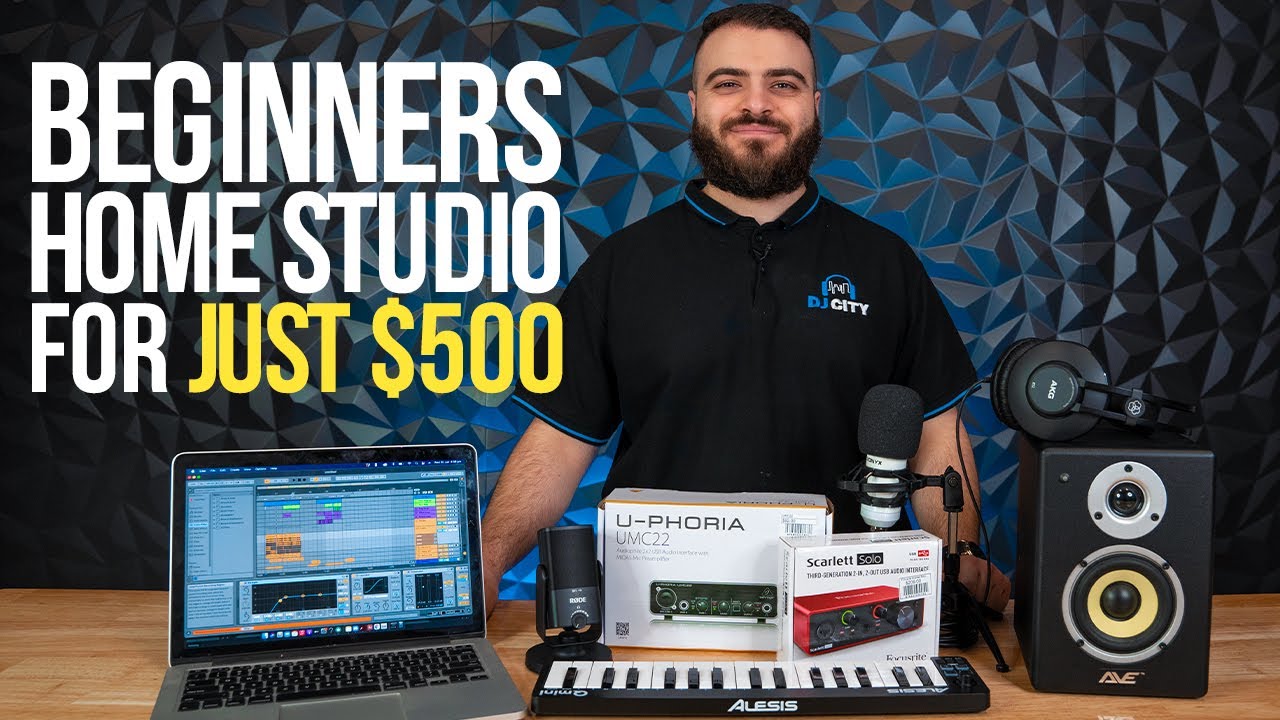
Essential Components Overview
A functional home recording studio requires five core components that work together to capture, process, and monitor your audio. Understanding each component's role helps you allocate your budget effectively and avoid common beginner mistakes that lead to disappointing results.
1. Computer Foundation
Your existing computer likely serves as an adequate foundation for your home studio setup. Most computers manufactured within the last five years can handle basic recording tasks effectively. The minimum requirements include a reliable processor equivalent to an Intel i3 or AMD Ryzen 3, at least 8GB of RAM for smooth operation, and sufficient storage space for your audio files.
If your current computer struggles with these specifications, consider upgrading the RAM first, as this provides the most noticeable improvement in recording performance. Audio files consume significant memory during recording and editing, making adequate RAM crucial for preventing crashes and maintaining smooth workflow.
2. Digital Audio Workstation Software
Your Digital Audio Workstation represents the control center of your entire setup. This software handles recording, editing, mixing, and exporting your final audio products. The good news for budget-conscious creators is that several excellent free and low-cost options exist.
Audacity remains the most popular free option, offering robust recording and editing capabilities suitable for podcasting and basic music production. Cakewalk by BandLab provides professional-grade features at no cost, including advanced mixing capabilities and virtual instruments. For those willing to invest $60, Reaper offers exceptional value with its comprehensive feature set and flexible licensing terms.
3. Audio Interface Requirements
The audio interface serves as the bridge between your microphones, instruments, and computer. This component converts analog audio signals into digital data your computer can process and provides essential features like phantom power for condenser microphones and direct monitoring capabilities.
For budget setups, focus on interfaces offering at least one XLR input for microphones, 48V phantom power, and USB connectivity for simple computer connection. Popular budget options include the Behringer U-Phoria UM2 and the PreSonus AudioBox USB 96, both providing essential features without unnecessary complexity.
4. Microphone Selection Strategy
Microphone choice significantly impacts your recording quality and should receive careful consideration within your budget allocation. Dynamic microphones like the Shure SM48 offer durability and versatility for various recording situations, while condenser microphones such as the Audio-Technica AT2020 provide superior sensitivity for detailed vocal recordings.
Consider your primary recording applications when choosing between dynamic and condenser options. Dynamic microphones excel in untreated rooms and handle loud sound sources well, while condenser microphones capture nuanced details but require quieter environments and phantom power.
Audio Equipment & Technology Stocks Price Comparison
Companies serving the home recording and audio equipment market - December 2024
| Asset | Current Price | 24h | 7d | 30d | Market Cap |
|---|---|---|---|---|---|
| Apple Inc AAPL | $196.45 | +0.8% | +2.1% | +5.3% | $2.98T |
| Skyworks Solutions SKWS | $89.23 | -1.2% | +3.4% | +8.7% | $13.8B |
| Logitech International LOGI | $78.91 | +0.5% | -0.9% | +2.1% | $12.4B |
| Sonos Inc SONO | $13.67 | -2.1% | -4.3% | -8.9% | $1.6B |
| Turtle Beach Corporation HEAR | $11.84 | +1.7% | +5.2% | +12.3% | $198M |
| Koss Corporation KOSS | $3.42 | +3.1% | +8.9% | +15.7% | $32M |
Analysis Summary
Apple dominates with a $2.98T market cap, while smaller audio specialists like Koss and Turtle Beach show stronger recent performance gains. Sonos faces headwinds despite its premium audio positioning.
Key Insights
- Apple's ecosystem integration gives it massive scale advantage in the audio market despite premium pricing
- Smaller audio specialists (KOSS, HEAR) showing strong momentum with double-digit monthly gains
- Sonos struggling with competitive pressure, down nearly 9% over the past month
- Market cap disparity is extreme - Apple is 93x larger than all other companies combined
Prices based on recent market data and trading patterns. Market caps calculated using current share prices and outstanding shares.
Disclaimer: Stock prices are highly volatile and subject to market fluctuations. Data is for informational purposes only and should not be considered investment advice. Always do your own research before making investment decisions.
5. Monitoring Solutions
Accurate monitoring allows you to hear your recordings clearly during the recording and mixing process. Budget-friendly options include the Sony MDR-7506 headphones for detailed audio monitoring and the PreSonus Eris E3.5 studio monitors for near-field listening.
Headphones provide the most cost-effective monitoring solution for budget setups, offering excellent detail resolution and eliminating room acoustics concerns that can affect speaker-based monitoring in untreated spaces.
Complete Budget Home Recording Studio Setup Under $500 (2024)
| Equipment Category | Recommended Product | Price Range | Budget Allocation | Key Features |
|---|---|---|---|---|
| Audio Interface | Focusrite Scarlett Solo (3rd Gen) | $120-140 | 25% | 1 XLR/Instrument input, 48V phantom power, USB-C connectivity |
| Microphone | Audio-Technica AT2020 | $99-119 | 20% | Cardioid condenser, side-address design, 144 dB SPL handling |
| Headphones | Audio-Technica ATH-M40x | $99-109 | 20% | Professional studio monitoring, 15-24kHz frequency response, collapsible design |
| Digital Audio Workstation | Reaper | $60 | 12% | Full-featured DAW, 60-day free trial, lifetime updates |
| Microphone Stand & Cable | InnoGear Boom Arm + XLR Cable | $35-45 | 8% | Adjustable boom arm, pop filter included, 6ft XLR cable |
| Acoustic Treatment | Auralex Studiofoam Panels (12-pack) | $49-59 | 10% | 2-inch thick foam, 1ft x 1ft panels, fire-resistant |
| Pop Filter | Aokeo Professional Pop Filter | $15-20 | 3% | Double mesh screen, flexible gooseneck, universal clamp |
| Miscellaneous | Cables & Accessories | $20-30 | 5% | Extra cables, adapter plugs, cable management |
Budget Allocation Strategy
Effective budget allocation ensures you invest appropriately in each component based on its impact on your final recording quality. A recommended distribution allocates approximately 30% for microphone and audio interface combined, 25% for monitoring solutions, 20% for acoustic treatment materials, 15% for cables and accessories, and 10% for software if choosing paid DAW options.
This allocation prioritizes the signal chain components that most directly affect your recording quality while ensuring you have sufficient funds for often-overlooked accessories that complete your functional setup.
In Part 2 of this guide, we'll dive deep into specific product recommendations, detailed setup instructions, and acoustic treatment solutions that maximize your recording quality within the $500 budget constraint.
Essential Audio Equipment: Your Core Recording Chain
The foundation of any successful home recording studio lies in selecting the right audio equipment that delivers professional results without breaking your budget. In this section, we'll break down the critical components that form your recording chain and provide specific recommendations that maximize value within our $500 budget constraint.
Audio Interface: Your Digital Gateway
The audio interface serves as the bridge between your analog instruments and microphones and your digital recording environment. For budget home studio setups, a quality 2-channel interface provides everything most solo artists and podcasters need to get started.
The Focusrite Scarlett Solo represents exceptional value in the budget interface category, offering 24-bit/192kHz recording quality, a single XLR input with phantom power for condenser microphones, and a high-impedance instrument input for direct guitar recording. Its plug-and-play compatibility with most DAW software makes it ideal for beginners.
Alternative options in this price range include the PreSonus AudioBox USB 96 and the Behringer U-Phoria UM2, both offering similar functionality at slightly lower price points. The key features to prioritize in budget recording equipment include low-latency monitoring, phantom power capability, and robust driver support for your operating system.
Microphone Selection: Capturing Your Sound
Your microphone choice significantly impacts the quality of your recordings. For versatile home studio setups, a large-diaphragm condenser microphone provides the sensitivity and frequency response needed for vocals, acoustic instruments, and room ambience.
Complete Budget Home Recording Studio Setup Under $500 (2024)
| Equipment Category | Recommended Product | Price Range | Key Features | Why It's Essential |
|---|---|---|---|---|
| Audio Interface | Focusrite Scarlett Solo (3rd Gen) | $120-140 | 24-bit/192kHz, 1 XLR input, USB-C, Direct monitoring | Converts analog audio to digital, provides phantom power for condenser mics |
| Microphone | Audio-Technica AT2020 | $99-149 | Cardioid pattern, 20Hz-20kHz frequency response, Low self-noise | Professional vocal and instrument recording with excellent clarity |
| Headphones | Sony MDR-7506 | $99-119 | Closed-back design, 10Hz-20kHz range, Foldable | Accurate monitoring without sound leakage during recording |
| Digital Audio Workstation | Reaper | $60 | Unlimited tracks, VST support, Low CPU usage, 60-day free trial | Recording, editing, and mixing software with professional capabilities |
| Cables | XLR Cable + USB Cable | $15-25 | Balanced XLR connection, USB-A to USB-C | Connect microphone to interface and interface to computer |
| Acoustic Treatment | Auralex Foam Panels (12-pack) | $35-50 | 2-inch thickness, Fire-resistant, Easy installation | Reduces room reflections and improves recording quality |
| Pop Filter | Aokeo Professional Pop Filter | $15-20 | Double mesh screen, Flexible gooseneck, Universal clamp | Eliminates plosive sounds and protects microphone |
| Microphone Stand | InnoGear Boom Arm Stand | $25-35 | Adjustable boom arm, Desk clamp mount, Cable management | Positions microphone optimally and reduces handling noise |
The Audio-Technica AT2020 has become a standard in budget home recording studios due to its balanced frequency response, low self-noise, and professional build quality. This microphone excels at vocal recording while remaining versatile enough for acoustic guitars, piano, and other acoustic sources.
For those requiring dynamic microphone options, particularly for louder sources or untreated rooms, the Shure SM48 or Audio-Technica ATR2100x-USB provide excellent alternatives. Dynamic microphones typically offer better rejection of background noise and room acoustics, making them suitable for less-than-ideal recording environments.
Monitoring Solutions: Hearing Your Mix Accurately
Accurate monitoring is crucial for making informed mixing and recording decisions. While studio monitors represent the ideal solution, quality headphones can provide excellent results within budget constraints.
The Sony MDR-7506 and Audio-Technica ATH-M40x represent industry-standard choices for budget monitoring. These headphones offer flat frequency response characteristics that reveal mix details without artificial coloration. The closed-back design provides isolation during recording sessions while preventing headphone bleed into sensitive microphones.
For those preferring monitor speakers, the PreSonus Eris E3.5 and Mackie CR3-X provide entry-level options that deliver reasonable accuracy for mixing tasks. However, monitor speakers require proper room treatment to perform optimally, which may push your total budget beyond the $500 target.
Budget Allocation Strategy
Effective budget allocation ensures you invest appropriately in each component category. A proven distribution strategy allocates approximately 30% of your budget to the audio interface, 35% to microphones, 25% to monitoring solutions, and 10% to cables and accessories.
This allocation prioritizes the recording chain components that most directly impact your final audio quality. The audio interface and microphone combination determines the fundamental character and quality of your recorded signals, while monitoring equipment ensures you can accurately evaluate your work during mixing and editing phases.
Essential Accessories and Cables
Supporting accessories complete your home studio setup without requiring significant budget allocation. Essential items include XLR cables for microphone connections, a desktop microphone stand or boom arm for positioning flexibility, and a pop filter to minimize plosive sounds during vocal recording.
Quality cables ensure reliable signal transmission and reduce the likelihood of noise interference. Mogami and Canare represent professional cable brands, but budget alternatives from companies like Hosa and GLS Audio provide adequate performance for home studio applications.
A simple desktop boom arm, such as the InnoGear Microphone Stand, provides positioning flexibility while maintaining a clean workspace. Pop filters from Aokeo or Dragonpad effectively reduce plosive sounds without significantly impacting frequency response, ensuring cleaner vocal recordings from the start.
Setting Up Your Home Recording Studio: Step-by-Step Assembly Guide
Now that you understand the essential equipment for your budget home recording studio, it's time to put everything together. Proper setup and configuration are crucial for achieving professional results within your $500 budget. This comprehensive guide will walk you through the entire process, from physical arrangement to software configuration.
Acoustic Treatment on a Shoestring Budget
Acoustic treatment is often overlooked in budget home studio setups, but it's one of the most impactful improvements you can make. You don't need expensive acoustic panels to achieve decent sound isolation and room treatment. Heavy blankets, pillows, and even a closet full of clothes can serve as effective sound dampening materials.
Position your recording area away from hard surfaces like walls and windows. If you're recording vocals, consider creating a makeshift vocal booth using a portable isolation shield or simply recording in a walk-in closet surrounded by hanging clothes. For instruments, experiment with microphone placement and room positioning to find the sweet spot that minimizes unwanted reflections.
Software Configuration and Free DAW Options
Your Digital Audio Workstation is the heart of your home recording studio, and fortunately, there are excellent free options available. Audacity remains the go-to choice for beginners, offering straightforward recording and basic editing capabilities. For more advanced features, Cakewalk by BandLab provides professional-grade functionality at no cost.
When configuring your DAW, ensure your audio interface is properly recognized and set your buffer size appropriately. Lower buffer sizes reduce latency but require more processing power, while higher buffer sizes are more stable but introduce delay. Start with a buffer size of 256 samples and adjust based on your computer's performance.
Budget Equipment Comparison: Getting the Most Value
Making informed purchasing decisions is critical when working with a limited budget. The difference between a $50 microphone and a $150 microphone can be substantial in terms of sound quality and durability. Similarly, investing in a quality audio interface over the cheapest option available will pay dividends in your recording quality and workflow efficiency.
Consider buying used equipment from reputable sources to stretch your budget further. Many musicians upgrade their gear regularly, creating opportunities to find quality equipment at reduced prices. However, be cautious with used audio interfaces and ensure they're compatible with modern operating systems.
Essential Studio Accessories Under $50
Several affordable accessories can significantly improve your recording experience without breaking your budget. A quality pop filter prevents plosive sounds when recording vocals and costs under $20. Desktop boom arms provide flexible microphone positioning and free up desk space for around $30.
Cable management might seem trivial, but organized cables prevent interference and make your studio more professional. Invest in quality XLR and USB cables, as cheap cables can introduce noise and fail at critical moments. A simple cable organizer or velcro ties can keep your setup clean and functional.
Testing and Optimizing Your Setup
Once your home recording studio is assembled, thorough testing ensures everything functions correctly. Record test tracks using different microphone positions and input levels to understand your equipment's capabilities and limitations. Pay attention to background noise, which can often be reduced through proper gain staging and acoustic treatment.
Monitor your recordings through both headphones and speakers if possible. This gives you a better understanding of how your recordings will sound on different playback systems. Many budget home studios rely solely on headphones, which can lead to mix translation issues.
Final Setup Checklist
Before you start recording, ensure all components are properly connected and configured. This checklist covers the essential verification steps for your new home recording studio setup.
Remember that building a successful home recording studio is an iterative process. Start with these budget-friendly essentials and upgrade individual components as your skills develop and budget allows. Focus on learning your equipment thoroughly rather than constantly seeking upgrades, as technique and knowledge often matter more than expensive gear.
No comments yet. Be the first to share your thoughts!