


What the budget buys
Your budget dictates the tradeoff between raw hardware quality and AI processing power. In 2026, entry-level smart microphones under $200 often include built-in noise suppression and automatic gain control, but they may lack the dynamic range required for professional voiceovers or live instruments. These tools are excellent for podcasters and streamers who need clean audio instantly, but they cannot replace a well-treated room or a high-end analog preamp.
Spending between $200 and $500 unlocks more sophisticated AI mixing assistants. These mid-range setups typically bundle a capable USB microphone with software that handles EQ, compression, and de-essing in real time. You are paying for convenience and consistency. The hardware might be plastic or aluminum, but the intelligent processing ensures your tracks sound polished without manual tweaking.
Budgets above $500 focus on hybrid workflows. Here, the AI tools are plugins or advanced interfaces that integrate with high-quality analog gear. You might buy a premium condenser microphone and pair it with a smart interface that automates monitoring levels. This approach gives you the best of both worlds: the sonic character of professional hardware and the efficiency of automated mixing. The key is recognizing that AI enhances the signal chain; it does not create a good recording from a poor source.
Models worth checking first
The home recording landscape in 2026 has shifted from manual signal chasing to intelligent assistance. You no longer need to be a mixing engineer to get a clean result; you need gear that handles the heavy lifting. The best AI-powered audio equipment bridges the gap between a professional studio workflow and a home setup, automating tasks like noise reduction, equalization, and monitoring calibration.
When comparing smart microphones and automated mixing tools, focus on how the AI integrates into your specific workflow. Some devices handle real-time processing at the hardware level, while others rely on software plugins that analyze your tracks after recording. Both approaches have trade-offs regarding latency, cost, and flexibility. The following comparison highlights the strongest options currently available for creators who value speed without sacrificing quality.
| Product | Type | Key AI Feature | Best For |
|---|---|---|---|
| Shure MV7+ | Smart Microphone | Auto-Level and Voice Isolation | Podcasters and vocalists |
| Universal Audio Volt 275 | Audio Interface | Smart Gain and Compression | Multi-instrument recording |
| iZotope RX 11 | Software Suite | Voice De-noise and Dialogue Isolate | Post-production cleanup |
| Yamaha CC1 | Controller | AI-assisted mixing suggestions | Mix engineers seeking reference |
Smart microphones like the Shure MV7+ represent the most direct entry point into AI-assisted recording. By embedding voice isolation and auto-leveling directly into the microphone’s DSP, these devices ensure a consistent signal regardless of your room’s acoustics or your speaking volume. This is particularly useful for home studios where untreated rooms can introduce unwanted reverb and background noise. The trade-off is less manual control over the raw signal, but for most home recording scenarios, the consistency outweighs the loss of granular adjustment.
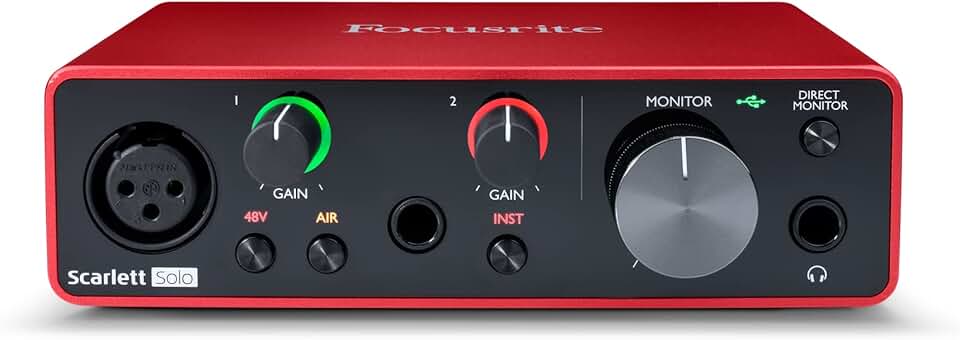
For those who record multiple instruments or prefer analog warmth, smart audio interfaces like the Universal Audio Volt 275 offer AI-driven gain staging. These interfaces analyze the incoming signal and automatically set the optimal gain level, preventing clipping while maintaining headroom. This feature simplifies the recording process, allowing you to focus on performance rather than technical settings. However, it requires a compatible interface and may not offer the same depth of control as a traditional preamp with manual knobs.
Software solutions like iZotope RX 11 provide the most comprehensive AI tools for post-production. Features like Voice De-noise and Dialogue Isolate can clean up recordings that were made in less-than-ideal conditions. While this doesn’t help with the initial recording, it acts as a safety net, allowing you to capture raw performances and refine them later. This approach is ideal for creators who prioritize flexibility and have the time to process their tracks.
Finally, AI-assisted mixing tools like the Yamaha CC1 controller offer suggestions for EQ and compression settings based on genre and reference tracks. These tools don’t replace the engineer but act as a second opinion, helping to balance levels and frequencies more quickly. This is particularly useful for beginners who are still learning the nuances of mixing. By providing a starting point, these tools can accelerate the learning curve and improve the overall quality of your mixes.
Check before you buy
AI-powered audio gear promises convenience, but the hardware behind the software must withstand the physical realities of a home studio. Smart microphones and automated mixing interfaces are expensive investments. A single failure in the signal chain can cost you hours of recording time or expensive repair bills. This inspection checklist focuses on the expensive failure points that standard reviews often overlook.

As an Amazon Associate, we may earn from qualifying purchases.
Costs that change the math
Use this section to make the Best AI-Powered Audio Equipment for Home Recording Studios in decision easier to compare in real life, not just on paper. Start with the reader's actual constraint, then separate must-have requirements from details that are merely nice to have. A practical choice should survive normal use, maintenance, timing, and budget. If a recommendation only works in an ideal situation, call that out plainly and give the reader a fallback path.
The simplest way to use this section is to write down the must-have criteria first, then compare each option against those criteria before weighing nice-to-have features.
Common questions about AI home studio gear
The rise of smart microphones and automated mixing tools has changed how home studios operate, but it hasn't removed the need for careful setup. Readers often worry that AI features might compromise audio fidelity or lock them into specific ecosystems. Below are the most practical questions about integrating these tools into your workflow in 2026.
Does AI processing degrade microphone quality?
Not when you use hardware with dedicated DSP chips. Modern smart microphones process noise cancellation and EQ locally on the device before sending the signal to your computer. This means the AI cleans up your voice without consuming CPU cycles or adding latency. You still need a good room, but the microphone handles the heavy lifting of background noise reduction, making it easier to get broadcast-quality audio without expensive acoustic treatment.
Can automated mixing replace a human engineer?
AI mixing tools are excellent for leveling, basic EQ, and compression, but they struggle with creative artistic choices. Think of AI as a tireless assistant that handles the technical drudgery, leaving you to focus on the emotional arc of the track. For home recording, this means you can achieve a polished sound much faster, but you still need to make final decisions on dynamics and spatial effects to give the track its unique character.
Is my computer powerful enough to run AI audio tools?
Most AI audio tasks are lightweight enough to run on standard laptops, but cloud-based processing shifts the burden to the internet rather than your hardware. If you use local AI plugins for noise reduction or stem separation, ensure your computer has at least 16GB of RAM and a multi-core processor. For real-time voice processing, a dedicated audio interface with low-latency drivers is more important than raw computing power.
Do I need to buy new gear to use AI features?
You can start with software-only solutions. Many DAWs now include AI-powered plugins for mixing and mastering that work with your existing microphones and interfaces. However, dedicated AI hardware, like smart microphones with built-in processing, offers a simpler workflow for podcasters and vocalists who want immediate results without navigating complex software settings. The best approach is to evaluate your specific needs: if you value speed and simplicity, hardware AI makes sense; if you value flexibility, software plugins are more versatile.
No comments yet. Be the first to share your thoughts!