

The shift from stereo to 3D
For years, we’ve been listening to audio in stereo – a left channel and a right channel. It’s been the standard, and it’s worked well. But spatial audio is changing that. It aims to create a more immersive and realistic listening experience by simulating a three-dimensional soundscape. Instead of sound appearing to come from speakers, it feels like it’s coming from around you.
Spatial audio works by mimicking how we hear. We locate sounds based on the tiny delays and volume shifts between our left and right ears. This tech just replicates those cues. The two main approaches you’ll encounter are binaural audio and ambisonics. Binaural audio records or processes sound as it would be heard by a human head, using two microphones placed in the ears of a dummy head.
Ambisonics, on the other hand, captures a full 360-degree soundfield. It's more complex, requiring specialized microphone arrays. Both rely on something called Head-Related Transfer Functions, or HRTFs. These are essentially filters that simulate how your head and ears shape sound. Apple has been a major driver of spatial audio adoption, particularly with the release of AirPods and their spatial audio features. This has pushed more creators to explore the format, and the technology is becoming increasingly accessible.
For podcasters, this means footsteps that actually creep up behind a listener in a mystery story, or forest sounds that wrap around the head in a nature doc. It isn't a replacement for stereo, but it's a better tool for building a specific atmosphere.
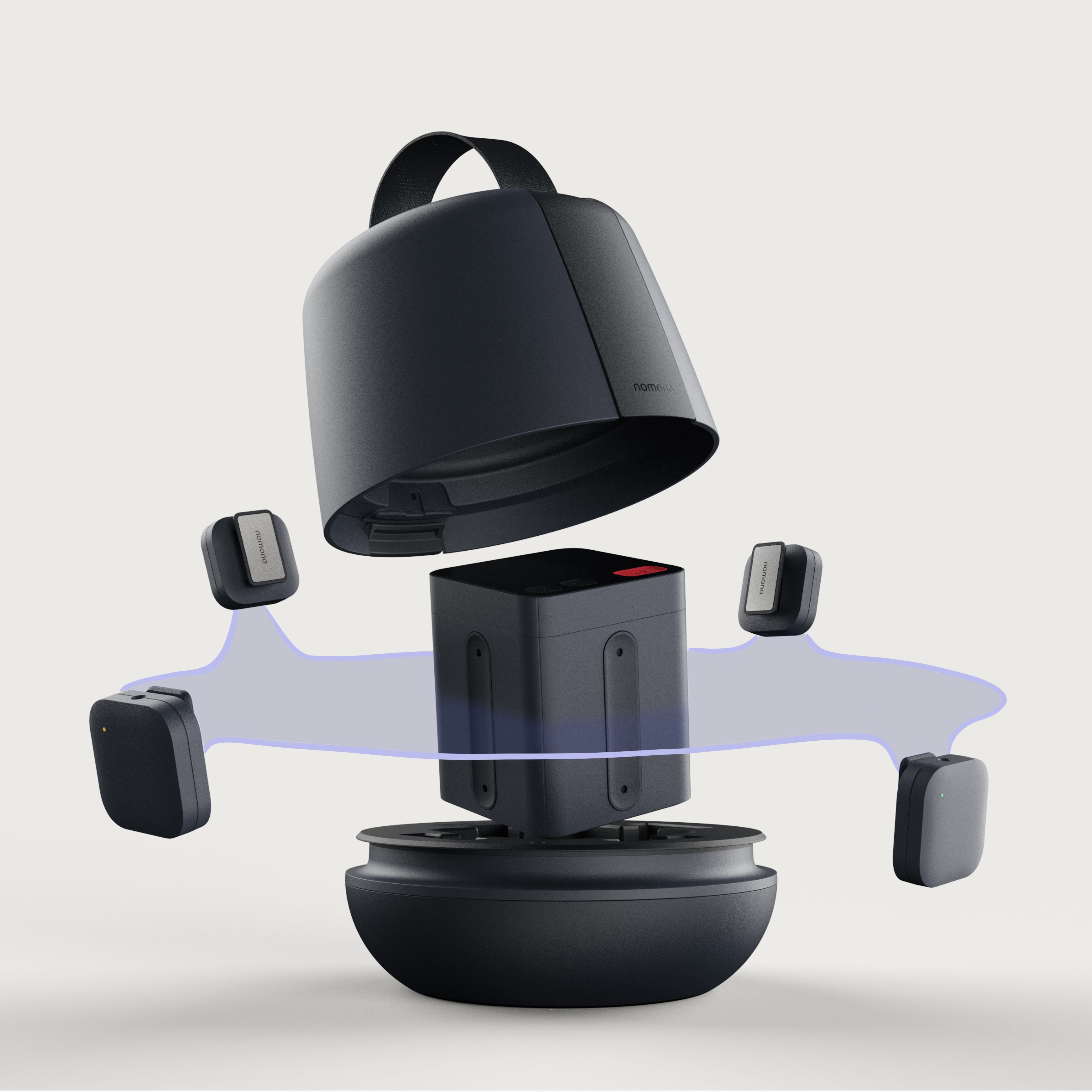
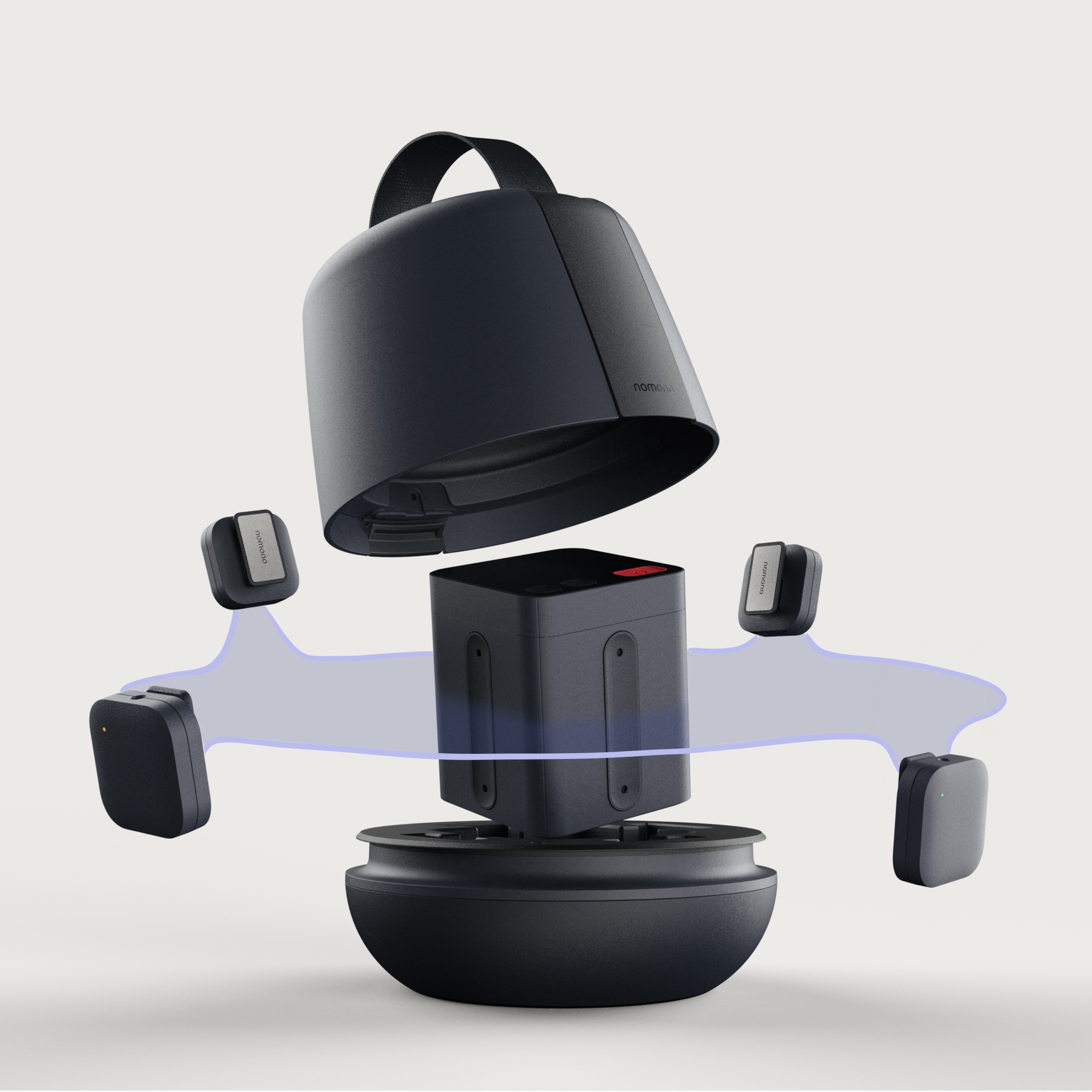
Microphones for 3D recording
So, how do you actually record spatial audio? It starts with your microphone setup. The gold standard for binaural recording is using a dummy head – a mannequin with microphones embedded in its ears. These can be incredibly accurate at capturing the nuances of human hearing, but they are also expensive. A decent dummy head setup can easily run you upwards of $1,000, and professional ones go much higher.
If a dummy head is out of your budget, you can experiment with ambisonic microphone arrays. The Sennheiser Ambeo VR Mic is a popular option, costing around $500. It contains multiple microphones arranged in a specific pattern to capture a 360-degree soundfield. These are easier to use than dummy heads, but require more post-processing to achieve the desired spatial effect. Another approach is to use multiple standard microphones – a technique sometimes called "binaural near-field recording."
With multiple standard mics, you’ll need to carefully position them to mimic the spacing and directionality of human ears. This takes practice and experimentation. Placement is key, no matter which method you choose. For interviews, consider placing microphones slightly behind the speakers’ ears to capture a more natural sound. For soundscapes, think about how you would naturally move through the environment to capture the sounds you want.
For storytelling, you may want to use multiple microphones to create a sense of movement and distance. Don't be afraid to experiment with microphone placement to find what works best for your content. Remember that spatial audio is about creating an illusion, and clever mic techniques are essential to achieving that illusion. The trade-off is always between cost, complexity, and the level of realism you’re aiming for.
Software and panning
Okay, you’ve recorded your spatial audio. Now what? The next step is to bring it into your digital audio workstation (DAW) and start manipulating the sound. Several DAWs offer native support for spatial audio or have plugins that can help you achieve the effect. Logic Pro X, for example, has built-in spatial audio tools that make it relatively easy to create immersive mixes.
Ableton Live and Pro Tools require plugins, but offer a lot of flexibility. Reaper is another excellent option, known for its customization and affordability. The key to spatial audio mixing is understanding that panning isn’t just about left and right anymore. You need to think in terms of elevation – how high or low a sound appears to be – and distance – how far away it sounds.
Most spatial audio plugins allow you to control these parameters. You’ll also encounter terms like "binaural panning’ and ‘ambisonic encoding." Binaural panning involves adjusting the amplitude and timing differences between the left and right channels to create a sense of direction. Ambisonic encoding converts a 360-degree soundfield into a format that can be decoded for playback on headphones.
My personal workflow involves using a combination of spatial panning plugins and EQ to create a sense of depth and realism. I start by positioning the main elements of the soundscape, then add subtle details to create a more immersive experience. It’s an iterative process, and it often takes a lot of tweaking to get it right. Don’t be afraid to experiment and trust your ears.
Essential Spatial Audio Plugins
There’s a growing number of plugins available to help you create spatial audio effects. DearVR Pro is a popular choice, offering a comprehensive set of tools for binaural panning and spatialization. It’s not cheap, typically around $299, but it’s incredibly powerful. Waves Nx is another well-regarded option, providing a virtual headphone mix environment that simulates listening on studio monitors. It’s priced around $99.
For ambisonic encoding, IEM Spatial Connect is a free and open-source plugin that’s widely used by spatial audio professionals. It’s a bit more technical to set up, but it offers a lot of control. Another option is Facebook’s 360 Spatial Sound Tool (free), which is designed for creating mixes for Facebook 360 videos, but can also be used for other spatial audio projects.
Don’t feel like you need to spend a lot of money to get started. Many DAWs have built-in panning and EQ tools that can be used to create a basic sense of spatialization. The key is to understand the principles of spatial audio and experiment with different techniques. Remember that plugins are tools, not magic bullets.
It’s important to be realistic about what you can achieve with plugins. They can enhance your spatial audio mixes, but they can’t fix a poorly recorded source or a bad microphone setup. Focus on capturing high-quality audio first, then use plugins to refine and enhance the spatial experience.
When to use spatial audio
Not every podcast benefits from spatial audio. It’s best suited for content where creating a sense of immersion and presence is important. Immersive storytelling is a natural fit – think mystery dramas, sci-fi adventures, or historical narratives. ASMR podcasts can also be incredibly effective with spatial audio, as it can enhance the tingling sensations and create a more intimate experience.
Audio dramas, of course, are a prime candidate for spatial audio. The ability to position characters and sound effects in a three-dimensional space can dramatically enhance the storytelling. Nature soundscapes are another great option – imagine being surrounded by the sounds of a rainforest or the ocean. Guided meditations can also benefit from spatial audio, as it can create a more relaxing and immersive atmosphere.
Even interviews can be improved with spatial audio. By carefully positioning the voices of the participants, you can create a sense of being in the room with them. Podcasts like Within the Whirlwind use spatial audio to great effect, creating a truly immersive listening experience. The Daily from the New York Times has also experimented with spatial audio for certain stories.
Consider what kind of emotional impact you want to have on your listeners. If you want them to feel like they are there – in the scene, in the moment – spatial audio is a powerful tool to use. But if your podcast is primarily focused on information or discussion, it may not be necessary.
Spatial Audio Podcasts
- Within the Wires - This anthology series presents fictional narratives told as found audio – podcasts, radio broadcasts, and more. Its spatial audio design excels at creating a sense of place and draws the listener directly into the story's environment.
- The Walk - A unique audio drama presented as a single, 90-minute walk. Spatial audio is integral to the experience, simulating the sounds of the environment changing as the listener 'walks' along with the narrator. The binaural sound design is incredibly immersive.
- Knifepoint Horror - This podcast features intensely atmospheric horror stories, often narrated in a single take. The use of spatial audio heightens the suspense and creates a deeply unsettling listening experience through realistic sound placement.
- Archive 81 - A horror fiction podcast presented as a found-footage audio diary. Spatial audio is used to emphasize the isolation and claustrophobia of the settings, and to create a sense of unease as the story unfolds.
- Rumble - A historical fiction podcast that uses sound design to transport listeners to different eras and locations. Spatial audio is employed to recreate the ambience of these historical settings, from bustling city streets to quiet countrysides.
- Passenger List - A mystery thriller presented as a recording from a missing cruise ship. The spatial audio design effectively simulates the sounds of being on a ship – waves, creaking metal, distant voices – enhancing the feeling of being lost at sea.
- Floodgate - This investigative journalism podcast utilizes spatial audio to recreate the scenes of its investigations. By placing sounds realistically within the environment, it draws listeners into the story and enhances the impact of the reporting.
Distribution & Listener Experience
Getting your spatial audio podcast to listeners is a bit more complicated than distributing a traditional stereo podcast. Apple Podcasts is currently the most robust platform for spatial audio, offering full support for the format. Spotify has also added spatial audio support, but it’s still somewhat limited. Other podcast platforms are slowly starting to adopt spatial audio, but it’s not yet universally available.
It’s important to note that spatial audio is best experienced with headphones. The effect is lost on speakers, as the sound cues are designed to be perceived by individual ears. Encourage your listeners to use headphones when listening to your podcast. Encoding formats are also a consideration. Apple Podcasts prefers spatial audio content encoded in Dolby Atmos, while other platforms may support different formats.
Spatial files are heavy. You have to balance bitrates so the stream doesn't buffer for the listener. Distribution is still the wild west; while Apple is all-in, other platforms are dragging their feet on Atmos support.
However, the potential benefits are significant, and I believe that spatial audio will become increasingly important in the years to come. It’s a powerful tool for creators who want to push the boundaries of audio storytelling and create truly immersive experiences.
Troubleshooting Common Spatial Audio Issues
Spatial audio isn’t without its challenges. Phasing issues can occur when sounds are out of sync, creating a muddy or unnatural effect. Inconsistent spatialization – where sounds jump around in the soundscape – can be distracting and immersion-breaking. Artifacts, such as clicks or pops, can also be a problem, especially when using plugins.
Compatibility problems can arise when listeners use different headphones or devices. Some headphones may not accurately reproduce the spatial cues, resulting in a less immersive experience. To troubleshoot these issues, start by checking your microphone setup and ensuring that your recordings are clean and free of noise. Experiment with different plugin settings to find what works best for your content.
Monitoring spatial audio accurately can be tricky. Regular speakers won’t give you a true sense of the spatial effect. Ideally, you should use a pair of high-quality headphones designed for spatial audio. Another tip: listen to your mix in multiple environments to ensure that it sounds good on different devices. Community feedback is also invaluable.
If you’re still having trouble, reach out to online forums and communities for help. There are many experienced spatial audio professionals who are willing to share their knowledge and expertise. Don’t be afraid to ask questions and experiment with different techniques.
No comments yet. Be the first to share your thoughts!