

What spatial audio actually is
For years, we’ve been listening to audio in stereo – a left and right channel that creates a sense of width. Spatial audio, though, aims to do much more. It’s about creating a three-dimensional soundscape where sounds appear to come from specific locations around you, not just from your left or right. This isn’t just about louder sound; it’s about a fundamentally different listening experience that feels more immersive and realistic.
Think about closing your eyes and trying to pinpoint where a sound is coming from in a real space. That's what spatial audio attempts to replicate. It utilizes techniques like binaural recording, which captures sound the way our ears naturally do, and relies heavily on Head-Related Transfer Functions (HRTFs). HRTFs are essentially filters that simulate how our head and ears shape sound, creating the illusion of direction and distance.
Apple pushed this tech into the mainstream through AirPods and Apple Music. It isn't just a marketing gimmick; it's a shift in how we handle phase and frequency to trick the brain. While the tools are still evolving, the jump from stereo to 3D is as distinct as the move from mono was decades ago.
The core idea is to create a sound field that convincingly places audio elements in a 360-degree space. This is achieved through careful recording techniques and sophisticated processing algorithms. It's a world away from simply adding reverb or widening effects. Spatial audio is about precise localization.
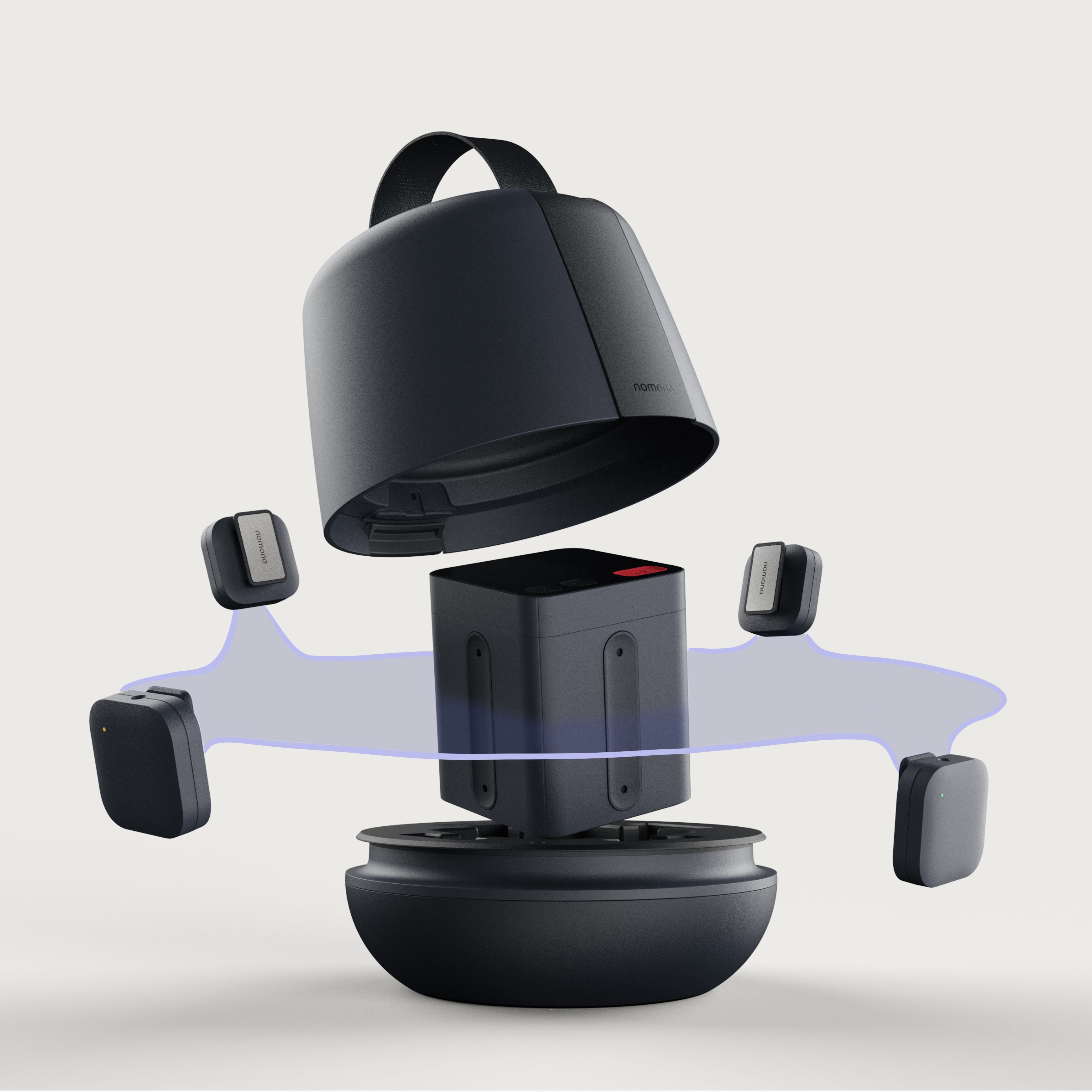
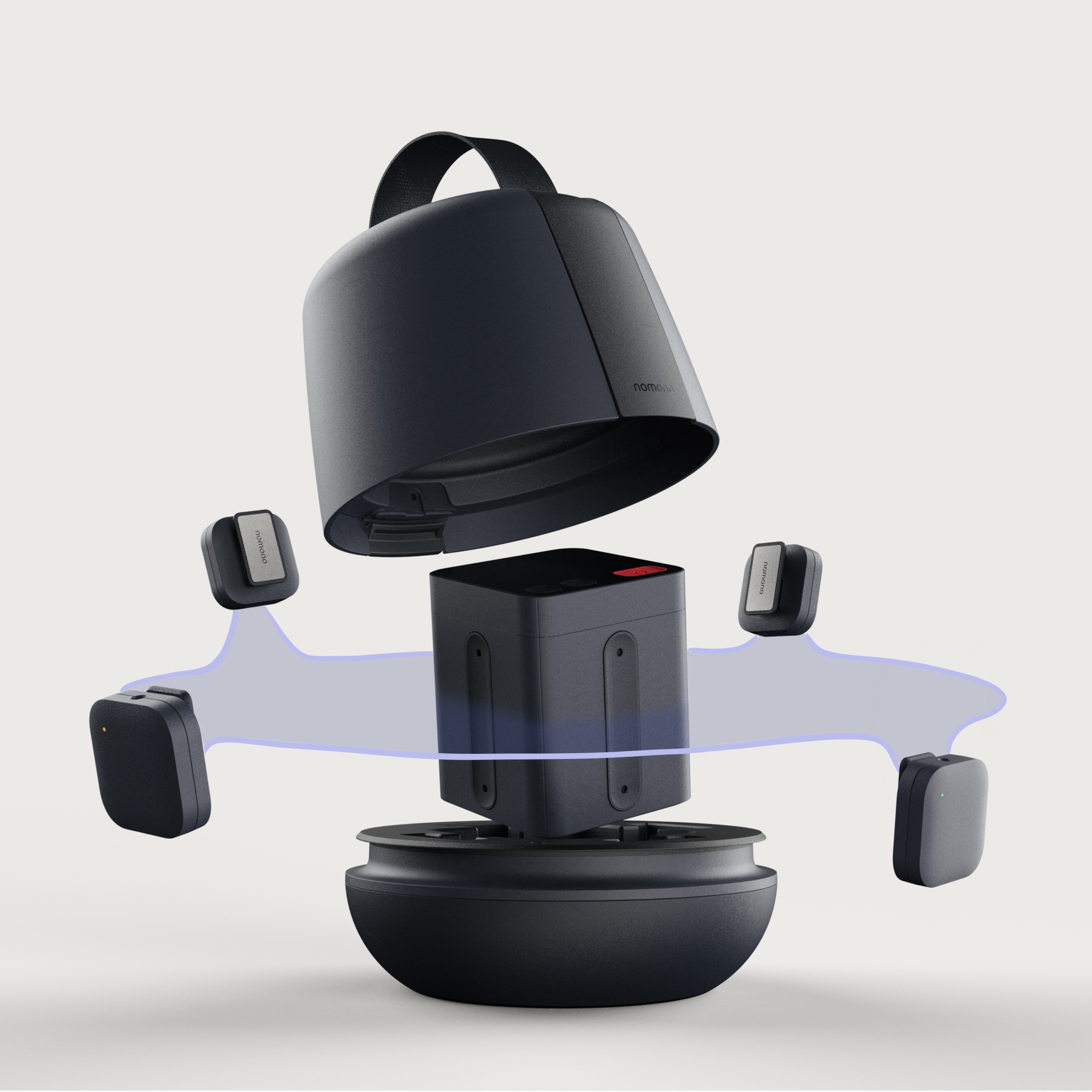
Microphone arrays for 360 capture
Capturing spatial audio requires more than just a standard stereo microphone. The key is using microphone arrays – multiple microphones arranged in a specific configuration to record sound from all directions. These arrays are the foundation of any spatial audio recording setup. Different configurations exist, each with its own strengths and weaknesses.
Ambisonics is a popular approach, using a spherical array of microphones to capture a full 360-degree sound field. This allows for maximum flexibility in post-production, as you can re-position sounds within the space. Binaural recording, on the other hand, uses a dummy head with microphones placed in the ear canals to simulate human hearing. This creates a very realistic, immersive experience, but can be less flexible for editing.
The type of microphones used within the array also matters. Omnidirectional microphones are often preferred for Ambisonics, as they capture sound equally from all directions. Cardioid microphones, which are more directional, can be useful for focusing on specific sound sources within the array. Costs for these setups vary wildly. A basic binaural setup can be assembled for a few hundred dollars, while a professional Ambisonics rig can easily cost several thousand.
Choosing the right array depends on your recording environment and desired outcome. A controlled studio environment might benefit from a precise Ambisonics setup, while a more naturalistic recording in a field setting might be better suited to binaural. There's no single 'best' approach; it's about finding what works for your specific needs.
Software Options: DAWs and Spatial Processors
Once you’ve captured your spatial audio, you’ll need software to process and mix it. Many Digital Audio Workstations (DAWs) are beginning to incorporate spatial audio tools, but the level of support varies. Logic Pro X, for example, has robust spatial audio mixing capabilities, allowing you to precisely position sounds in a 3D space.
However, spatial audio processing isn’t limited to DAWs. Dedicated spatial audio processors and plugins can offer more advanced features and control. Companies like DearVR and Waves offer plugins that can be used within various DAWs to create immersive soundscapes. Apple also provides its own Spatial Audio tools for developers, allowing them to integrate spatial audio into their iOS and macOS apps.
The learning curve can be steep. Spatial audio mixing is a different skillset than traditional stereo mixing. It requires understanding concepts like HRTFs, sound propagation, and psychoacoustic principles. Don't expect to achieve professional results overnight. It takes time and practice to learn how to effectively manipulate spatial audio.
Here’s a quick look at some popular options (as of late 2026):
- Logic Pro X handles 3D panning natively and works best if you're already in the Apple ecosystem.
- Reaper: Highly customizable DAW with growing spatial audio plugin support.
- Pro Tools: Industry standard DAW, adding spatial audio features with third-party plugins.
- DearVR Pro works as a plugin for most DAWs and offers more granular control over room reflections than stock tools.
- Waves Nx: Virtual checkroom for spatial audio mixing and monitoring.
DAW Comparison: Spatial Audio for Podcast Production (2026)
| DAW Name | Spatial Audio Format Support | Ease of Use | Price | Plugin Ecosystem |
|---|---|---|---|---|
| Logic Pro | Strong native support for Dolby Atmos, spatial audio plugins. | Intermediate. Intuitive interface, but spatial audio workflows require learning specific tools. | One-Time Purchase | Extensive, with many third-party spatial audio plugins available. |
| Ableton Live | Good support via Max for Live and third-party plugins. Flexible routing allows for experimentation. | Intermediate to Advanced. Requires more manual setup for spatial audio compared to Logic Pro. | Subscription or One-Time Purchase | Very strong, particularly for creative audio manipulation and effects. |
| Reaper | Highly customizable, supports spatial audio through VST plugins and routing. Requires more technical knowledge. | Advanced. Powerful but has a steeper learning curve. Highly configurable. | Affordable One-Time Purchase | Excellent. Large community and many free/paid plugins, including spatial audio options. |
| Pro Tools | Expanding support for spatial audio, particularly with Dolby Atmos. Industry standard for post-production. | Intermediate to Advanced. Traditional workflow can be less intuitive for spatial audio initially. | Subscription or Perpetual License | Industry-leading. Extensive plugin options, but spatial audio plugins can be expensive. |
| Steinberg Nuendo | Designed with spatial audio in mind, native support for Dolby Atmos and Ambisonics. | Advanced. Professional-grade DAW with a complex feature set. | One-Time Purchase | Robust, with a focus on professional audio production tools. |
| Audacity | Limited native spatial audio support. Relies heavily on third-party plugins. | Beginner. Simple interface, but spatial audio requires additional setup. | Free | Basic. Plugin support exists, but options for spatial audio are limited. |
Qualitative comparison based on the article research brief. Confirm current product details in the official docs before making implementation choices.
Calibrating for your specific ears
Spatial audio relies on HRTFs to create the illusion of 3D sound. However, HRTFs are unique to each individual – shaped by the size and shape of our heads and ears. Using a generic HRTF can diminish the effectiveness of spatial audio, making the experience less immersive and accurate. This is where headphone calibration comes in.
Personalized HRTF calibration involves measuring your unique HRTF and using that data to tailor the spatial audio experience to your ears. Several tools and services offer HRTF calibration, some using specialized microphones and software, others relying on subjective listening tests. Companies like Sonarworks and Em3D offer HRTF customization options.
The challenge is accessibility. Accurate HRTF measurement can be expensive and time-consuming. Many calibration tools require specialized equipment and expertise. Furthermore, the results aren’t always perfect. HRTFs can change over time due to factors like weight fluctuations or ear canal modifications. This makes ongoing calibration ideal, but often impractical.
Personalized calibration is the only way to get pinpoint accuracy. We're seeing more software-based solutions that use phone cameras to map ear shapes, which beats paying for a lab session.
Podcast Workflows: From Recording to Distribution
Integrating spatial audio into a podcast workflow requires careful planning. During recording, consider the positioning of speakers and microphones. For interviews, arrange speakers in a semi-circle around the microphone array to capture their voices accurately in space. Experiment with microphone placement to find the optimal configuration for your recording environment.
In post-production, use a DAW with spatial audio mixing capabilities to precisely position sounds in the 3D space. Pay attention to the perceived distance and direction of each sound source. Use automation to create dynamic movements and transitions. Remember that spatial audio is about more than just panning sounds left and right; it’s about creating a believable soundstage.
Encoding and distribution are the final hurdles. Apple Podcasts fully supports spatial audio podcasts, using a multi-channel audio format. Spotify also offers spatial audio support, but the implementation details can vary. Research the specific requirements of each platform before encoding your podcast. Currently, most platforms support Dolby Atmos or MPEG-H 3D Audio.
File format support is constantly evolving. As of late 2026, commonly used formats include Dolby Atmos ADM and MPEG-H 3D Audio. Ensure your DAW and encoding software support the chosen format. It's also important to test your podcast on different devices and headphones to ensure a consistent listening experience. Some platforms may downmix spatial audio to stereo for devices that don't support it.
Troubleshooting Common Spatial Audio Issues
Setting up and recording spatial audio can be challenging. You’re likely to encounter issues along the way. One common problem is phase cancellation, where certain frequencies are reduced or eliminated due to interference between microphones. Careful microphone placement and gain staging can help minimize this issue.
Inaccurate localization is another frequent complaint. If sounds don’t appear to be coming from the correct location, double-check your spatial audio mixing settings and ensure your HRTF calibration is accurate. Experiment with different microphone configurations and processing techniques. Sometimes, even small adjustments can make a big difference.
Compatibility problems can also arise. Not all devices and headphones support spatial audio, and even those that do may interpret the audio differently. Always test your spatial audio podcasts on a variety of platforms and devices to ensure a consistent experience. Consider providing a stereo downmix for listeners who don't have spatial audio capabilities.
Here are a few frequently asked questions:
- Q: My spatial audio sounds 'flat'. What could be the problem? A: Check your HRTF calibration and ensure your microphone array is properly configured.
- Q: I'm getting a lot of phasing issues. How can I fix them? A: Experiment with microphone placement and gain staging. Avoid placing microphones too close together.
- Q: My podcast sounds different on different devices. What should I do? A: Provide a stereo downmix and test your podcast on a variety of platforms and headphones.
No comments yet. Be the first to share your thoughts!