

Sound Quality Doesn't Need a Fortune
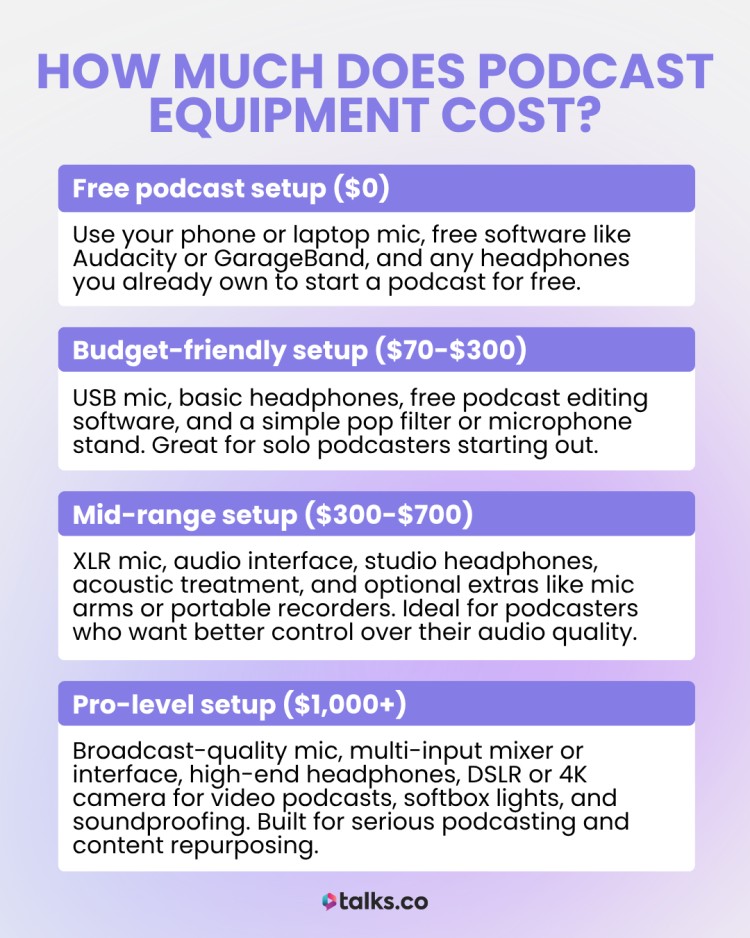
Podcasting is booming. More and more people are starting shows, and the barrier to entry has never been lower. You can record an episode with just your phone, but let's be honest – audio quality matters. Listeners are pretty forgiving when it comes to video quality, but bad audio is a quick way to lose an audience.
The good news is, you don't need to spend a fortune to get professional-sounding results. This guide is about building a capable podcast setup without emptying your wallet. We're focusing on equipment available right now, in late 2026, and keeping everything under $500.
Prices fluctuate, of course, but we’ll give you current estimates based on what we’re seeing from major retailers. This 2026 edition reflects the latest gear and pricing, so you can be confident you’re getting the best value for your money.
The $500 Podcast Kit: 10 Top Picks
Let’s get down to the gear. Here are 10 pieces of equipment that will significantly improve your podcast audio, all staying within our $500 budget. Prices are approximate as of November 2026, and can vary depending on the retailer and any ongoing sales. We’ve ordered these from lowest to highest price.
First up is the Samson Q2U Dynamic Microphone ($60). This is a fantastic entry-level mic, especially for solo podcasters. It’s USB, meaning it plugs directly into your computer, and it includes a basic stand and cable. The sound quality is surprisingly good for the price, and it’s incredibly easy to use. A downside is its limited flexibility compared to XLR options.
Next, the Aokeo Professional Microphone Pop Filter ($10). It’s a small investment that makes a big difference. This simple accessory reduces plosives – those harsh "p’ and ‘b" sounds that can ruin a recording. It attaches easily to most microphone stands.
The InnoGear Microphone Boom Arm Stand ($25) is another essential. This frees up desk space and allows you to position the microphone exactly where you need it. It’s adjustable and relatively sturdy for the price. Keep in mind that cheaper stands can be wobbly.
The Samson Go Mic Portable USB Condenser Microphone ($40) is a great option if you need something ultra-portable. It’s small enough to clip onto your laptop or use on the go. Sound quality is decent, but it’s more susceptible to background noise than a dynamic mic.
Moving up in price, we have the Behringer UMC22 Audio Interface ($50). This is where things start to get a bit more serious. An audio interface converts analog signals (from your microphone) into digital signals that your computer can understand. It generally provides cleaner sound and more control than a direct USB connection. The UMC22 is a basic but reliable option.
The Audio-Technica ATH-M40x Studio Monitor Headphones ($99) are a step up from standard consumer headphones. They offer a flat frequency response, meaning they reproduce sound accurately. This is important for editing and monitoring your audio. They’re also comfortable for long recording sessions.
The Audio-Technica ATR2100x-USB Dynamic Microphone ($100) is a very popular choice for podcasters. It’s similar to the Samson Q2U, but offers slightly better sound quality and build quality. It’s also a dynamic mic, so it’s good at rejecting background noise. It’s a workhorse.
The Sony MDR-7506 Professional Headphones ($149) are an industry standard. These headphones are known for their durability, comfort, and accurate sound reproduction. They’re a favorite among audio professionals and podcasters alike. They are closed-back, which helps isolate sound.
The Zoom PodTrak P4 Podcast Recorder ($199) is a dedicated podcast recorder. This eliminates the need for a computer during recording. It has four microphone inputs, making it ideal for interviews or co-hosted shows. It can also record directly to an SD card. It’s a great all-in-one solution.
Finally, the Focusrite Scarlett Solo Audio Interface ($129) is a popular and well-regarded interface. It offers excellent sound quality and is easy to use. It provides phantom power for condenser microphones and has a gain control for adjusting the input level. It's a solid choice for serious beginners.
Featured Products
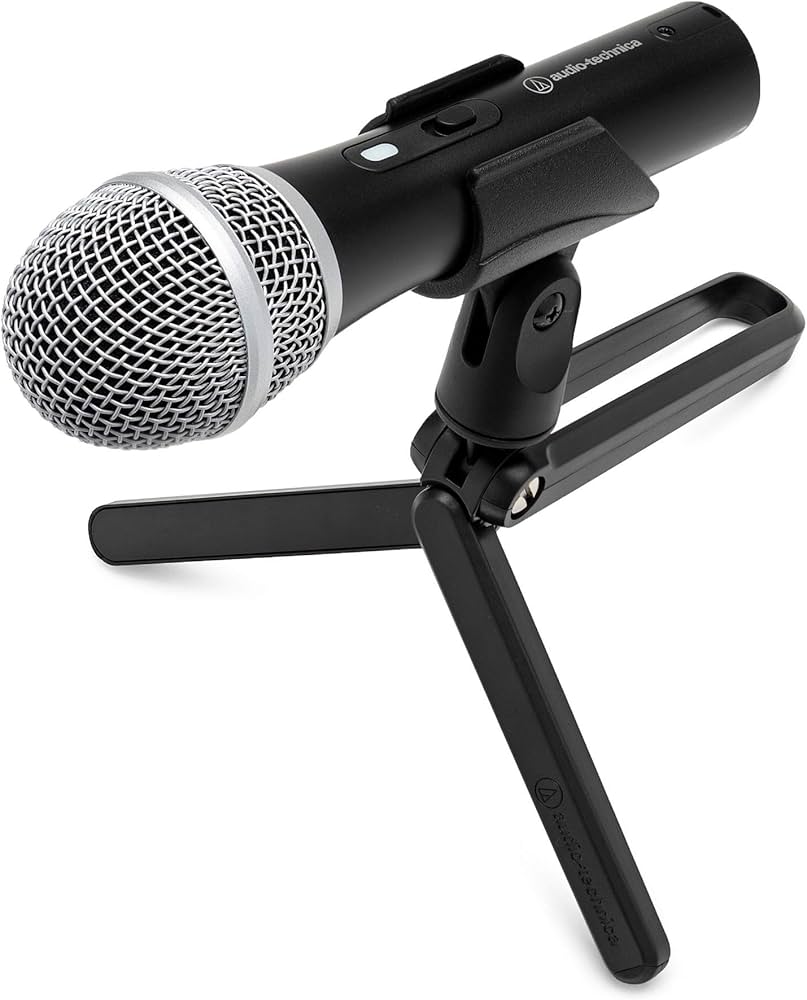
Dual USB/XLR output connects to your computer or traditional mixer · Cardioid dynamic element focuses on your voice and reduces background noise · Built-in headphone jack for zero-latency monitoring
This versatile microphone offers both USB and XLR connectivity, making it a flexible choice for beginners and experienced podcasters alike, with excellent sound quality for its price point.
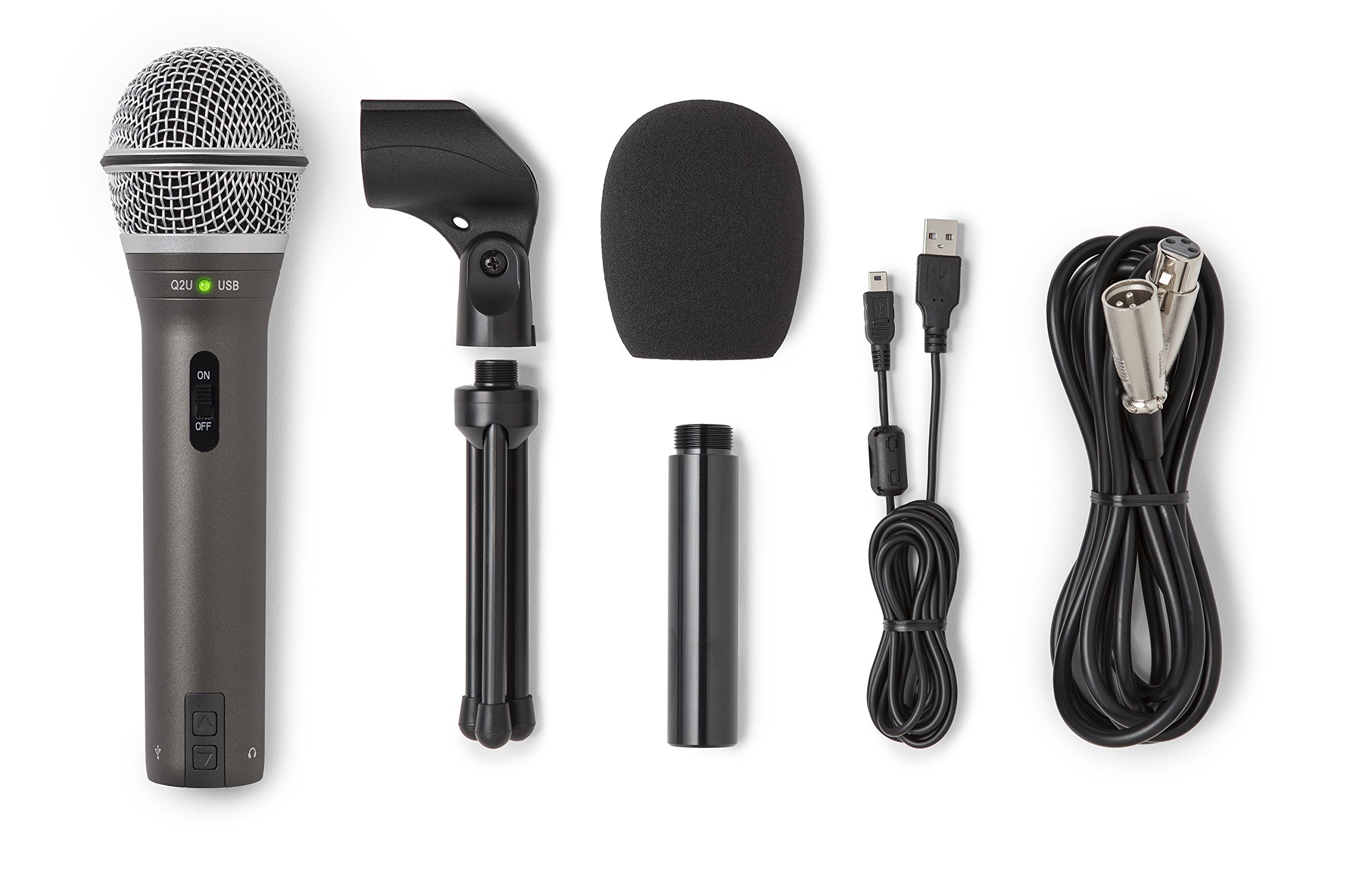
Combines analog XLR and digital USB output · Plugs directly into your computer or traditional mixer · Built-in headphone jack for direct monitoring
The Samson Q2U is a highly recommended dynamic microphone for podcasting due to its dual USB/XLR connectivity, robust build, and ability to produce clear, focused audio.
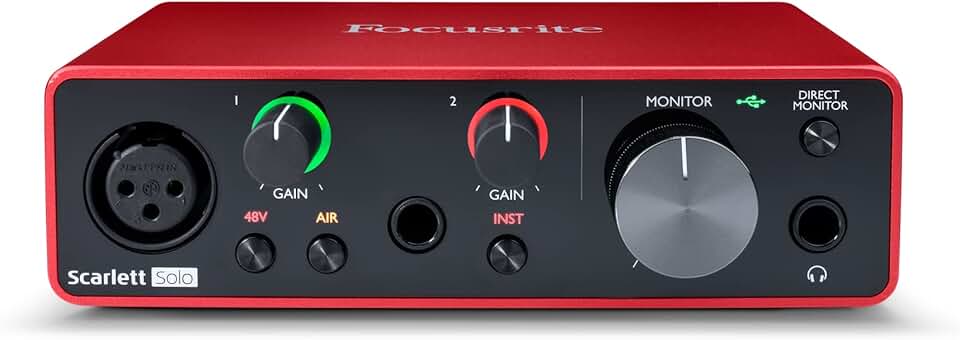
High-performance converters for studio-quality sound · One microphone input with a pristine preamp · Includes Pro Tools | First, Ableton Live Lite, and other creative software
The Scarlett Solo provides a professional-grade audio interface with excellent preamps and essential software, offering a significant upgrade in sound quality for vocalists and podcasters.
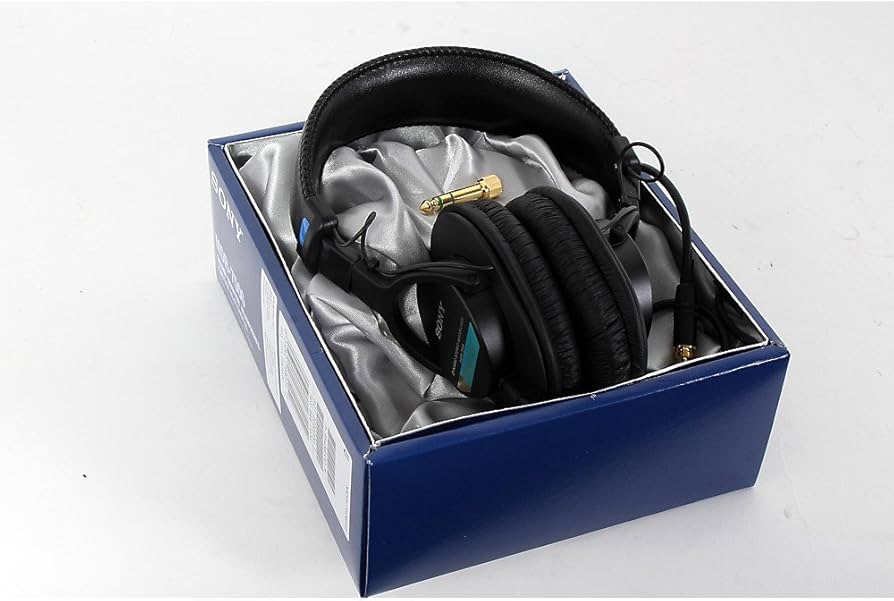
Closed-ear design for excellent sound isolation · Durable construction for professional use · Wide frequency response for accurate audio reproduction
These industry-standard headphones deliver exceptional clarity and isolation, crucial for monitoring your audio accurately during recording and editing sessions.
As an Amazon Associate I earn from qualifying purchases. Prices may vary.
Microphone Types: Dynamic vs. Condenser
When choosing a microphone, you’ll encounter two main types: dynamic and condenser. Dynamic microphones are more rugged and less sensitive. They’re great for noisy environments because they primarily pick up sound directly in front of them. Think of them as workhorses – reliable and forgiving. The Samson Q2U and ATR2100x-USB are both dynamic microphones.
Condenser microphones, on the other hand, are more sensitive and capture a wider range of frequencies. This results in a more detailed and nuanced sound. However, they also pick up more background noise. They require phantom power – a 48V power supply provided by an audio interface or mixer. They are better suited for quiet, controlled recording environments.
Polar patterns also matter. A cardioid pattern picks up sound primarily from the front, rejecting sound from the sides and rear. This is ideal for podcasting. An omnidirectional pattern picks up sound from all directions, which is useful for recording multiple speakers around a table, but less ideal for solo work.
Audio Interfaces: Why You Need One
An audio interface is the bridge between your microphone and your computer. While USB microphones are convenient, an interface generally delivers better sound quality and more control. It converts the analog signal from your microphone into a digital signal that your computer can understand.
Interfaces provide phantom power for condenser microphones, and they offer gain control, allowing you to adjust the input level and prevent clipping (distortion). A good interface also minimizes latency – the delay between when you speak and when the sound is heard. Low latency is crucial for comfortable monitoring.
USB microphones connect directly to your computer via USB. XLR microphones, which are often preferred by professionals, connect to an audio interface via XLR cables. The interfaces we’ve mentioned, like the Behringer UMC22 and Focusrite Scarlett Solo, work with XLR microphones.
Headphones: Monitoring Your Sound
Good headphones are essential for podcasting. You need to be able to accurately monitor your audio while recording and editing. This allows you to identify and correct any problems, such as background noise or distortion. Closed-back headphones are generally preferred for podcasting because they isolate sound and prevent bleed into the microphone.
Consider comfort, too. You’ll likely be wearing headphones for extended periods. Look for headphones with comfortable earcups and an adjustable headband. Noise cancellation can be helpful, but it’s not always necessary. The Audio-Technica ATH-M40x and Sony MDR-7506 are both excellent choices.
Accessories: Don't Forget These!
Don’t underestimate the importance of accessories. A microphone stand keeps your microphone stable and in the correct position. A pop filter reduces plosives. A shock mount isolates the microphone from vibrations. XLR cables are necessary for connecting XLR microphones to an audio interface. And a headphone adapter may be needed if your headphones have a different connector than your interface.
Creating a quiet recording space is also crucial. Even the best equipment can’t overcome a noisy environment. Choose a room with soft surfaces (carpets, curtains) to absorb sound. Consider using acoustic panels or foam if you’re serious about sound quality.
Software: Free and Affordable Options
You’ll need software to record and edit your podcast. Audacity is a free, open-source audio editor that’s surprisingly powerful. It has all the essential features for recording, editing, and mixing audio. GarageBand (for Mac users) is another excellent free option.
If you’re willing to spend some money, Adobe Audition and Descript are professional-grade audio editors. However, for many podcasters, Audacity or GarageBand are more than sufficient. Basic editing techniques include noise reduction, leveling the audio (making sure it’s consistent), and adding intro/outro music.
Our Top 3 Standouts Under $200
Narrowing down the list, here are three items that stand out as particularly good value for money, especially for beginners. The Audio-Technica ATR2100x-USB Dynamic Microphone ($100) is a fantastic all-around mic that offers excellent sound quality and ease of use. It’s a great starting point for any podcaster.
The Samson Q2U Dynamic Microphone ($60) is an even more affordable option that still delivers surprisingly good results. It’s perfect for those on a very tight budget. It's a great entry point to see if podcasting is for you.
Finally, the Audio-Technica ATH-M40x Studio Monitor Headphones ($99) are a worthwhile investment. Good monitoring is critical for producing high-quality audio, and these headphones will help you hear exactly what you’re recording.
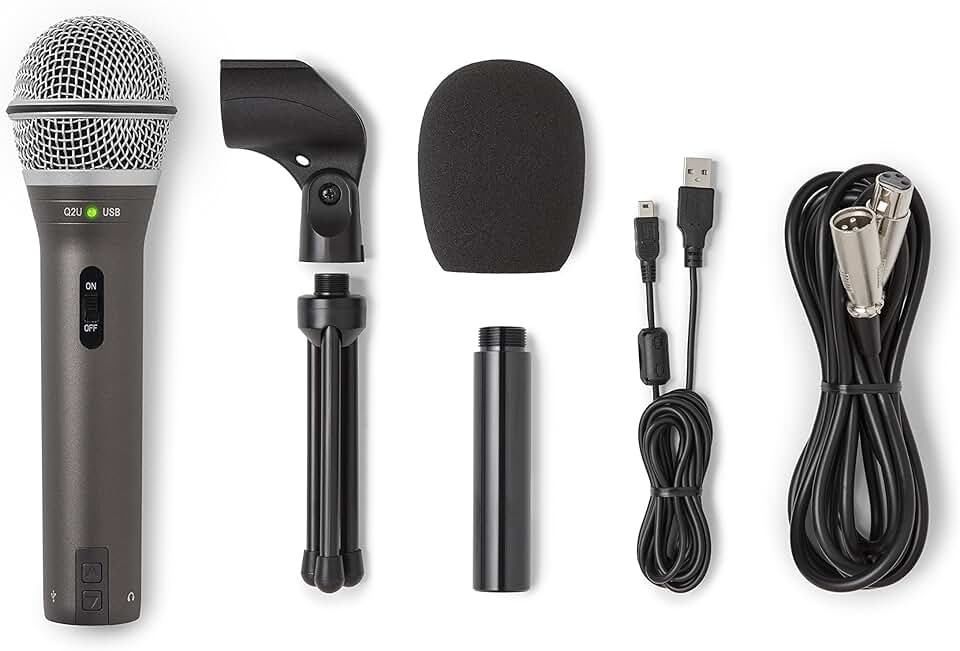
SAMSON Technologies Q2U USB/XLR Dynamic Microphone Recording and Podcasting Pack (Includes Mic Clip, Desktop Stand, Windscreen and Cables), Silver
- Dual USB/XLR output for versatile connectivity
- Dynamic microphone capsule for excellent off-axis rejection
- Built-in headphone jack for zero-latency monitoring
- Includes mic clip, desktop stand, windscreen, and USB/XLR cables
The Samson Q2U is an outstanding value, offering both USB and XLR connections for immediate plug-and-play use or future upgrades. Its robust build and included accessories make it an ideal, budget-friendly starter microphone for any new podcaster.
View on Amazon →As an Amazon Associate I earn from qualifying purchases.
No comments yet. Be the first to share your thoughts!